

Welcome to a comprehensive guide designed to facilitate the seamless payment of PhilHealth contributions for both employers and voluntary members. Our focus centers on the generation of the Statement of Premium Account (SPA) specifically tailored for online payment convenience.
It’s important to note that the information provided here is for educational purposes only, and neither the author nor Pinoy Guides is affiliated with PhilHealth. For specific inquiries regarding membership details or insurance benefits, we encourage you to direct your questions to the appropriate authorities.
Dive into this resourceful guide and empower yourself with a straightforward method for fulfilling your PhilHealth obligations.
What is Statement of Premium Account or SPA in PhilHealth?
The Statement of Premium Account (SPA) in PhilHealth is a crucial system-generated billing statement that encapsulates key financial details for contributors. This statement includes vital information such as a reference number, total premium due, covered period, and any applicable interest or discounts.
For employers, the Electronic Premium Remittance System (EPRS) serves as a convenient platform for generating SPAs through their accounts.
On the other hand, voluntary members can access and generate their SPAs seamlessly through the user-friendly PhilHealth Portal.
This streamlined process ensures that both employers and voluntary members can easily obtain and comprehend their billing information, promoting efficiency in managing PhilHealth contributions.
How Can Employers Generate SPA?

The Electronic Premium Remittance System (EPRS) stands as an innovative online platform designed to revolutionize and streamline various tasks associated with PhilHealth contributions. Its primary purpose is to eliminate manual processes, offering a more efficient means for employers to update company lists, transmit premium payments, and report employee contributions to PhilHealth.
Since April 2015, the mandatory usage of EPRS has been enforced for all employers, as mandated by PhilHealth Circular No. 004-2015.
To access the PhilHealth Portal and generate a Statement of Premium Account (SPA) or Premium Payment Penalty Statement (PPPS), follow these steps:
- Access PhilHealth Portal: Visit philhealth.gov.ph.
- Navigate to Online Services: Click on “Online Services.”
- Select Contribution: Choose the “Contribution” option.
- Log in to EPRS: Use your PEN Number and password to log in to EPRS with an employer account.
- Access Remittance Management: Go to “Remittance Management” and click on “Remittance Status” to view a list of employees.
- Set Applicable Period: Edit the month and year for the Applicable Period.
- Review Employee Premiums: Check employee premiums/shares by selecting “Payment Management” and “Payment Posting.”
- Generate SPA/PPPS: Click the printer icon and choose “Generate SPA/PPPS.”
- Review and Submit: Recheck information and click “Submit.”
- Print SPA: Click the print icon to generate the SPA.
Following these steps ensures a systematic and accurate process for employers to manage PhilHealth contributions and generate necessary statements efficiently.
How Can PhilHealth Voluntary Members Generate SPA?
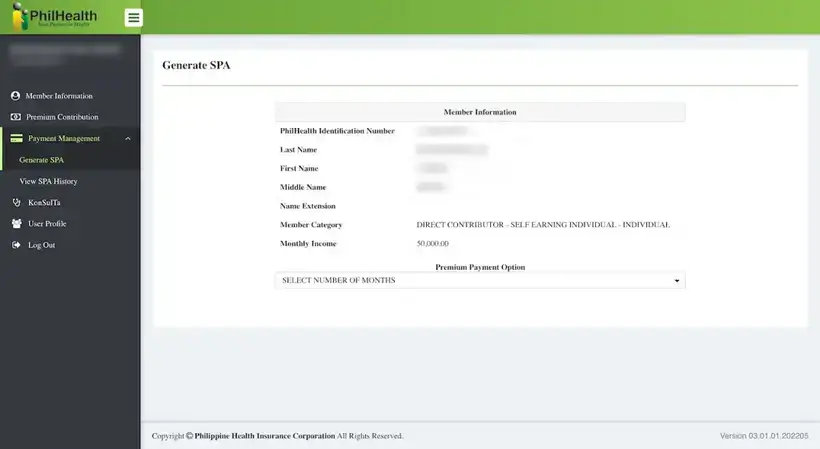
To generate your Statement of Premium Account (SPA) as a PhilHealth Voluntary Member, follow these steps:
- Login: Access the PhilHealth portal using your PhilHealth number.
- Captcha: Enter the provided captcha code.
- Navigation: Click the dropdown arrow next to Payment Management on the left menu.
- Generate SPA: Select “Generate SPA.”
- Payment Duration: Under “Premium Payment Option,” choose the number of months (1 to 36 months) for payment.
- Payment History: View your payment history, including the total outstanding amount, based on reported monthly income.
- Generate SPA: Click “Generate Statement of Premium Account (SPA)” to proceed.
By following these straightforward steps, PhilHealth Voluntary Members can efficiently navigate the portal and generate their SPA, ensuring a seamless experience in managing their premium statements.