
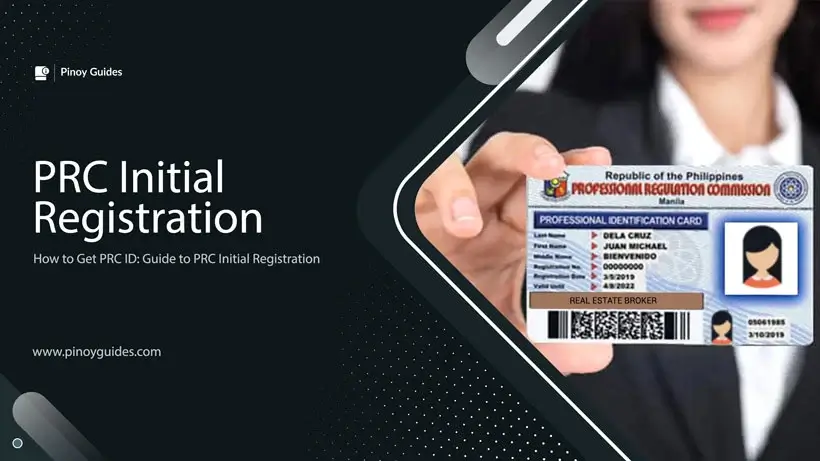
Celebrating the remarkable accomplishment of passing the professional licensure exam in the Philippines, this serves as a congratulatory acknowledgment to those who have successfully achieved this feat. Among thousands of Filipinos who aspire to attain professional licensure, this achievement stands as a testament to dedication and hard work.
It’s an honor worthy of profound gratitude and acknowledgment, recognizing the uniqueness of this success amidst numerous aspirants. As you revel in this milestone, the final step towards formalizing your professional status awaits—the PRC initial registration.
This crucial process marks the culmination of your journey, transforming your hard-earned achievement into a licensed profession. This comprehensive guide aims to provide an in-depth walkthrough of the registration process, oath-taking, and the subsequent steps necessary to secure the coveted PRC license, solidifying your place among the country’s licensed professionals.
Who Meets the Qualifications for PRC Initial Registration and Oath-Taking?
Eligibility for the initial registration process administered by the Professional Regulation Commission (PRC) is extended to individuals who have successfully applied for and passed the licensure examination. To confirm their qualification, successful examinees are advised to verify their results through the PRC website or in commonly distributed newspapers.
As a mandatory prerequisite, completing the online registration via the PRC platform is an essential step that must be fulfilled before participating in the mass oath-taking ceremony and obtaining the prestigious PRC license or identification card. This mandatory online registration ensures a streamlined and organized process for the official recognition of individuals as licensed professionals within their respective fields.
Registration Process for Recent Board Exam Passers by the PRC
1. Gather and Prepare the Required Documents
Essential Documents and Forms
Before embarking on the Professional Regulation Commission’s (PRC) initial registration process, ensure you have the following documents readily available:
- Community Tax Certificate (Cedula): This document, obtainable from the barangay or municipal hall, serves as a crucial requirement for the completion of the Oath form. Ensure you have the necessary details for accurate submission.
- Printed and Completed Oath Form: Have the Oath form filled out accurately and completely before the registration process. The Community Tax Certificate details are essential to complete this form.
- ID Pictures and Other Stationery: Prepare two colored ID pictures, each sized at 2 x 2 inches, taken within the last 6 months, featuring a plain white background, and wearing decent attire with a collar. Additionally, you’ll need two documentary stamps and one short brown envelope, which can be purchased directly from the PRC.
Additional Requirements and Fees
In addition to the core documents mentioned above, be mindful of the following supplementary requirements and applicable fees:
- Notice of Admission (NOA): The NOA is a necessary document for identification purposes. Make sure to keep it handy during the registration process.
- Registration Fee: The registration fee is payable online after securing an appointment. Note that the fee varies based on the type of exam taken. For instance:
- Baccalaureate degrees: Php 1,050
- Non-baccalaureate degrees: Php 870
- Medical representative and real estate salesperson: Php 450
- Ocular pharmacology: Php 1,200
Ensure you have all these documents in order and fees prepared to facilitate a smooth and efficient PRC initial registration process. Stay vigilant regarding any updates or additional requirements from the PRC for your particular licensure exam.
2. Access the PRC Online Portal
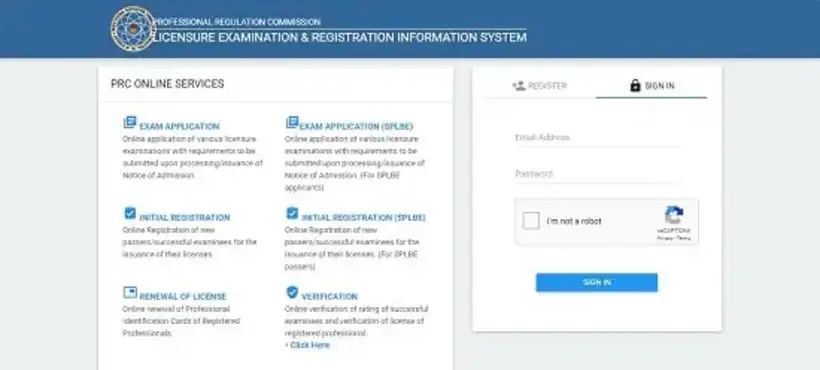
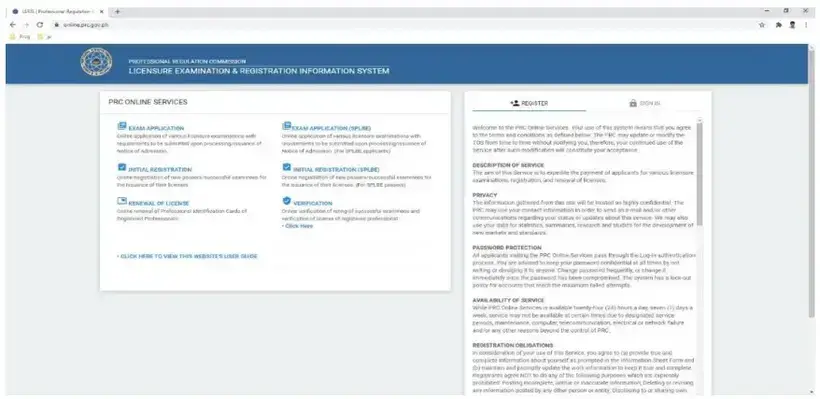
Navigating the PRC online portal, commonly referred to as the Licensure Examination and Registration Information System (LERIS), is the initial step to access various services provided by the Professional Regulation Commission. If you’ve previously applied for an examination through this platform, there’s no requirement to create a new account.
Simply log in using the same website with the email address and password used during your prior transaction. In case you’ve forgotten your password, the process is easily rectified by requesting a password reset. Reach out to prc.helpdesk2@gmail.com to initiate the password recovery procedure, ensuring smooth and uninterrupted access to the PRC online portal for your registration and examination needs.
3. Select the Transaction Purpose
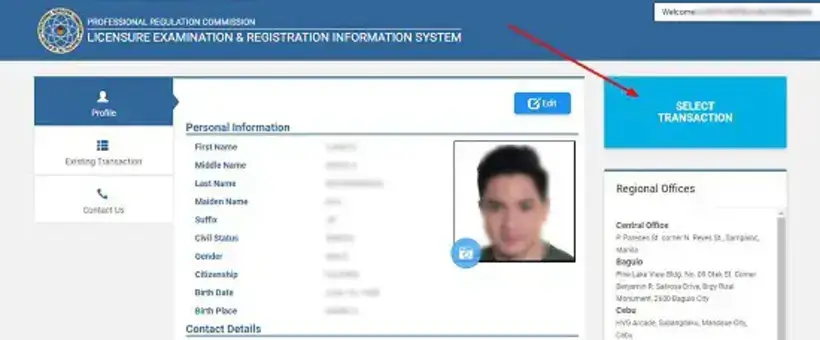
Upon successfully signing into the platform, you’ll gain access to your profile page, housing essential personal information and your uploaded picture.
To proceed with the registration process, click on “Select Transaction” positioned at the upper right-hand corner of the page.
Clicking this prompts a pop-up window featuring several tabs. To initiate your initial registration as a new passer, select the “Initial Registration” tab from the options available.
Subsequently, input the necessary details such as your chosen profession (for instance, Professional Teacher) and the application number, which can be found on your Notice of Admission (NOA). Ensure accurate submission of these details to progress with your registration process smoothly within the PRC online portal.

After completion, select “Proceed” to advance to the subsequent step.
4. Schedule an Appointment
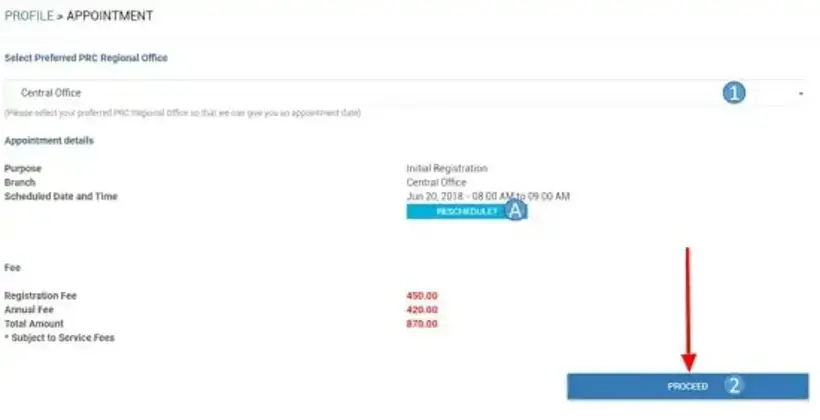
Securing an appointment with the Professional Regulation Commission (PRC) is an imperative step for various procedures such as initial registration, exam applications, or PRC ID renewal.
During this process, you’ll need to select your preferred PRC Regional Office or service center for the appointment. Once chosen, the system will automatically generate the appointment date and time if available slots are open. It’s crucial to ensure all the necessary requirements are prepared and submitted on the scheduled appointment date.
While scheduling, it’s essential to consider a few significant points:
- First, appointment slots are provided without charge, and it’s advisable to refrain from engaging fixers who may demand payment for securing appointments.
- Also, remember that appointments must be arranged in advance as same-day appointments are not feasible.
Upon receiving the appointment details, if the provided schedule aligns with your availability, proceed to confirm it. If adjustments are needed, the “Reschedule” option can be used, allowing you to select another date. Ensure to provide a reason for the change and proceed to the subsequent step in the appointment process.
5. Choose Your Payment Method

Your online appointment will only be considered valid upon payment of the necessary registration fee. The Professional Regulation Commission (PRC) provides users with various payment options to complete this process.
Bancnet/Land Bank/GCash
This option is an excellent choice for online payment of the registration fee. It requires having an account with Land Bank (ATM), GCash, or any Bancnet-participating bank for the transaction. These platforms offer secure online payment methods, ensuring swift and efficient processing of your payment.
PRC – Cashier
Opting to pay the registration fee at your selected PRC Regional Office or service center on your appointment date is another viable choice. A transaction summary will be displayed, indicating the precise payment amount. Simply click “Submit” to proceed with the payment process.
UCPB (United Coconut Planter’s Bank)
For exam application, initial registration, or PRC ID renewal, payments can be made at any UCPB branch. Upon making the payment, a confirmation with a reference number will appear. The validation of payment may take 2 to 3 working days.
Credit or Debit Card (PayMaya – VISA)
Using a credit or debit card through PayMaya (VISA) offers a convenient payment method. This option deducts the total registration fee along with a 1.25% convenience fee from your account. It provides ease and flexibility for those who prefer card transactions.
PayMaya
Utilizing the PayMaya wallet presents a swift and straightforward approach to pay the PRC initial registration fee. With a nominal convenience fee of Php 8.00, this option ensures a quick and efficient payment process.
6. Visit the PRC Office or Service Center to Submit Necessary Documents
Heading to the PRC Office or Service Center is the next step in finalizing your initial registration. Upon arrival, head to the specified window designated for the initial registration process. Here, you’ll be required to provide the necessary documents as per the registration guidelines.
After submitting the required paperwork, a PRC officer will guide you through signing the Registry Sheet, known as the Roster of Registered Professionals. It’s vital to note that personal submission of documents and signing the Registry Sheet are essential for participating in the mass oath-taking ceremony.
Following this step, reference the subsequent guide to gain a comprehensive understanding of the process for face-to-face, special, or online oath-taking registration. This ensures a smooth continuation of the necessary procedures for formalizing your registration as a licensed professional.
How Do I Register for the Oath-Taking?
In response to the challenges posed by the health crisis and restrictions on large gatherings, the Professional Regulation Commission (PRC) introduced Resolution No. 1255 to facilitate online oathtaking, aiming to adapt to the prevailing circumstances. Effective from August 3, 2020, this resolution served as a pivotal step in revolutionizing the oathtaking process.
The Step-by-Step Guide for Online Oathtaking provides comprehensive instructions for new passers seeking to apply for and participate in the virtual or online oathtaking ceremony. PRC Resolution No. 1255 outlines the necessary guidelines for the online oathtaking application, ensuring a seamless and secure process while conducting virtual special oathtaking ceremonies during public health emergencies.
This innovative approach allows new licensure exam passers the convenience of completing their initial registration and taking their oath from the comfort of their homes, offering both safety and compliance with health protocols.
1. Access the PRC LERIS Website
2. Access Your Account by Logging In
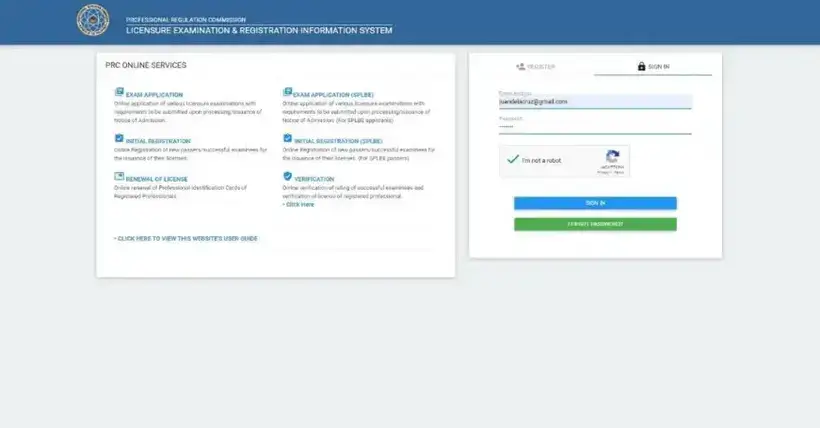
To access your PRC account, utilize the email address and password established during your initial licensure exam application. Ensure a seamless login process by using the same credentials created previously.
In the event that you’ve forgotten or misplaced your password, simply request a password reset by contacting prc.helpdesk2@gmail.com. This way, you can swiftly regain access to your account and continue with your PRC transactions hassle-free.
3. Choose ‘Oath’ as Your Transaction Type
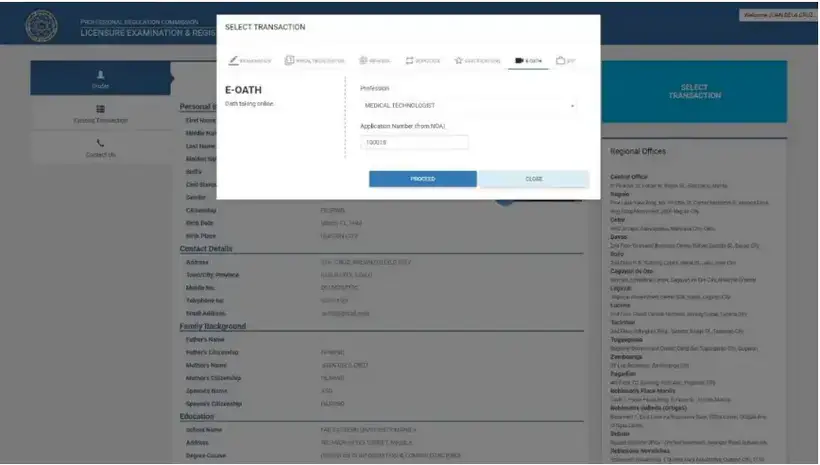
To access oath transactions, start by clicking on “Select Transaction” and then opt for “Oath” from the tabs displayed. Once selected, proceed to choose your preferred oath-taking type, whether online or face-to-face, and then select your specific profession from the dropdown list provided. Following this, input your Application Number from your Notice of Admission (NOA).
The system automatically verifies only those who have passed their licensure exams, with valid application numbers being processed for the transaction.
After entering the necessary details, click “PROCEED” to advance to the appointment module for further processing, ensuring a smooth continuation of the transaction.
4. Book an Appointment Slot
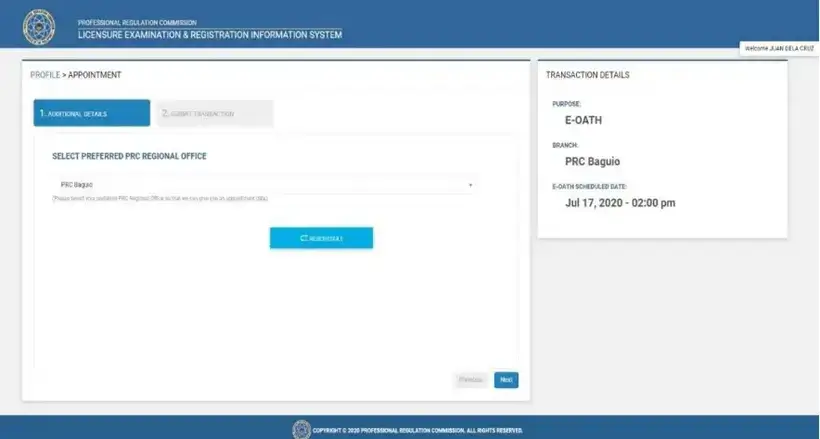
Within the appointment module, choose your desired PRC Regional Office. After selecting, click on “NEXT,” prompting the system to automatically present the earliest available date for the online oathtaking, which can be viewed in the provided screenshot above.
5. Verify and Send Your Application
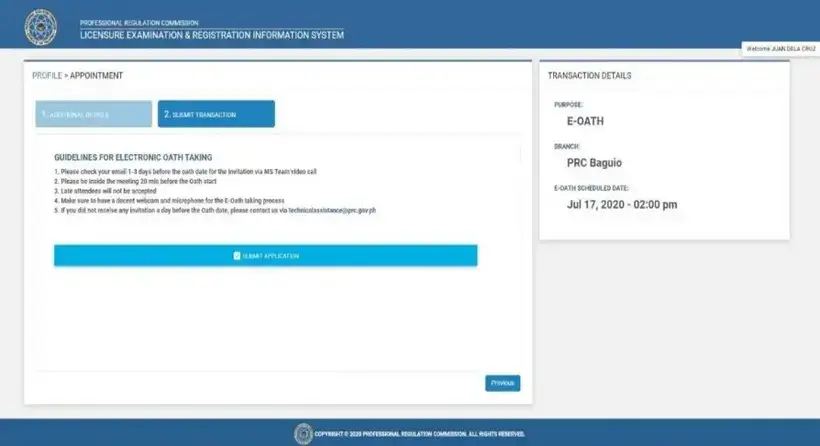
Upon reviewing the instructions for the virtual oathtaking, select ‘SUBMIT APPLICATION’ to continue.
6. Wait for the Confirmation Notification
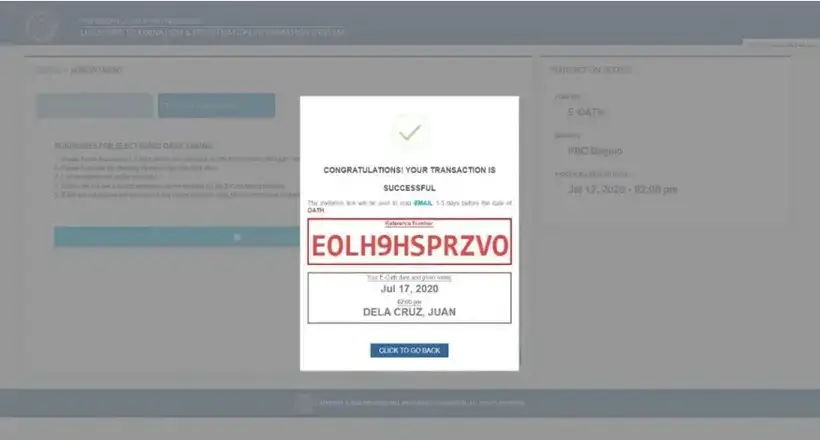
The confirmation message will include a reference number along with your transaction summary. To access your “Existing Transaction,” simply click the “CLICK TO GO BACK” button provided.
7. Print a Copy of Your “Oath of Professional” Form
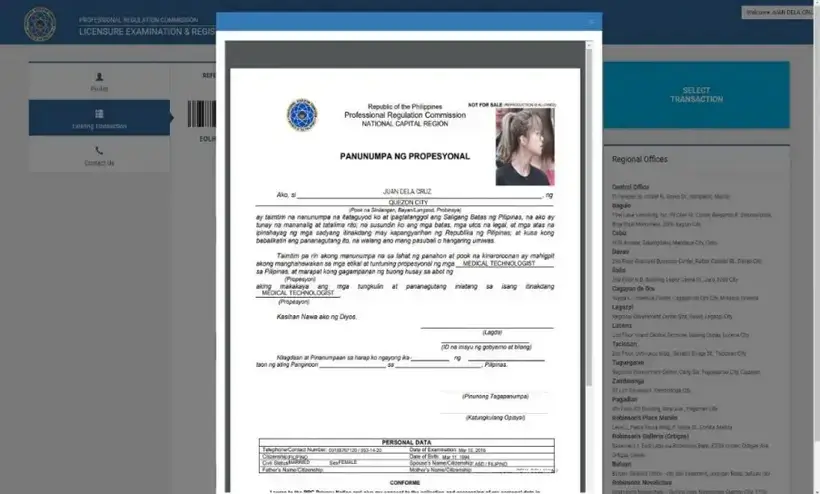
Within the “Existing Transaction” section, you’ll locate comprehensive details of your ongoing transaction. Look for the “PRINT DOCUMENT” button associated with your oath form and proceed to click it for printing.
8. Wait for the Confirmation Email from PRC
Await the arrival of a confirmation email from the Professional Regulation Commission (PRC), which will contain essential details for your online oathtaking experience. This email will encompass the invitation link and password necessary for the video conference, typically conducted via Microsoft Teams or Zoom.
Expect to receive this confirmation email in your registered email address approximately 1-3 days before the scheduled virtual or online oath-taking event. In the event that you do not receive the invitation link a day before the scheduled oath date, don’t hesitate to reach out to technicalassistance@prc.gov.ph for technical support and guidance.
This ensures you are fully prepared for the virtual ceremony and can address any last-minute concerns for a smooth and successful experience.
9. Prepare Technically for Online Oath-Taking
For the upcoming oath-taking ceremony, it is essential to await the official announcements from the PRC to determine the designated video conferencing platform, such as Microsoft Teams or Zoom, relevant to your profession.
Upon confirmation, swiftly download the specified application on your computer or device. Familiarize yourself with its operational features beforehand to ensure a seamless experience during the scheduled ceremony.
Additionally, prepare your setup by ensuring you have a good quality webcam, microphone, and a stable internet connection to facilitate smooth participation. Create a dedicated space with minimal distractions and background noise to uphold the solemnity of the virtual event during the oath-taking ceremony.
10. Follow the Pre-Ceremony Protocol Guidelines
Before the online oathtaking ceremony, ensure to keep the following in mind:
- Dress Code: Adhere to formal or business attire standards for the ceremony to maintain a professional appearance.
- Backdrop Selection: Ensure a white backdrop, whether it’s a physical setup or a virtual background, for consistency throughout the entire event.
Prompt Attendance and Invitation Link Instructions:
- Early Joining: Access the invitation link provided via email and ensure joining the online oathtaking meeting at least 15 minutes before the scheduled start time.
- Screening Time: For example, if the ceremony begins at 10:00 AM, participants must be present between 9:00 AM and 9:45 AM. Latecomers won’t be granted access to the session.
Single Device Usage and Link Sharing Policy:
- Single Device Usage: Use only one device to access the ceremony and avoid sharing the meeting link details with unauthorized individuals.
- Participant Integrity: Individuals appearing under multiple names or joining more than once will be considered in violation of the rules, resulting in disqualification from the online oathtaking. Violators may not be readmitted but can arrange for an alternative appointment.
11. Take Your Oath
The sequence of the oath-taking ceremony will proceed as follows:
- Invocation: The ceremony commences with an invocation.
- National Anthem: A rendition of the national anthem.
- Welcome Remarks: Introduction and a warm welcoming speech.
- Roll Call of the Inductees: Calling of the names of inductees.
- Recital of the Professional’s Oath: Participants will recite the professional’s oath.
- Closing Remarks: Concluding address.
Guidelines for Online Oath-Taking:
- Maintain Proper Decorum: Maintain appropriate behavior and respect throughout the event.
- Restrictions During the Event: Stay within the video conference, avoid loud noises, phone calls, distractions, or displaying objects or people. Keep audio on MUTE except during the oath recital.
- Missed Participation: Missing the scheduled oath-taking offers an opportunity for rescheduling another appointment.
How Can I Claim My PRC ID and Certificate of Registration (COR)?
Following the oath-taking ceremonies, the issuance of the Professional Regulation Commission Identification Card (PRC ID) and the Certificate of Registration (COR) typically takes place.
In the event of missing the ceremony, individuals can claim their PRC ID and COR at Window-13 of the Registration Division at the PRC office after five working days from the scheduled oath-taking date.
For those who have missed the mass oath-taking, a specific request for a special or individual oath-taking must be made to the relevant Board, providing valid reasons for their absence.
Once obtained, the PRC ID empowers individuals to legally practice their profession. It’s important to note that the Professional Identification Card holds a validity period of three years and necessitates renewal during the birth month of the cardholder to maintain its validity for continued professional practice.
Frequently Asked Questions
1. Is There a Deadline Set by PRC for the Initial Registration?
The Scheduled Registration Period is established by PRC immediately following the release of exam results. Successful examinees are advised to monitor the official PRC Facebook page to stay updated on the online registration schedule. Attempting to secure an appointment outside the specified period may result in a lack of available slots.
Considering the high volume of online registration, it might be practical to delay registration by a few days. It’s crucial to remain aware of the registration deadline to ensure timely registration and avoid the risk of missing out on available slots.
2. How to Proceed If I’ve Lost My Notice of Admission (NOA)?
Ways to request assistance from PRC for a replacement Notice of Admission (NOA):
- In-Person Visit: Visit the PRC office or service center where you originally applied for the exam. Request a replacement NOA in person.
- Email Contact: Reach out to the designated PRC help desks via email:
- prc.helpdesk2@gmail.com (PRC Help Desk)
- prc.application@gmail.com (Exam Application)
- prc.reg@gmail.com (Initial Registration and License Renewal)
- Phone Hotline Contact: Call the PRC hotline numbers at 310-00-26 or 310-10-4 during working hours (8 AM to 5 PM), Monday to Friday.
3. What is the Appropriate Action When a “For PRC Verification” Prompt Appears Upon Signing In?
Actions recommended by PRC upon “For PRC Verification” Notification:
- In-Person Visit: Head to the nearest PRC office and discuss the issue with the staff for necessary assistance and resolution.
- Email Contact: Send an email to prc.helpdesk2@gmail.com outlining the problem. Essential information to include in the email comprises your registered email address, profession, a 7-digit license number, and attaching a screenshot of the error message for better clarification and swift resolution.
4. Is it Possible to Obtain My PRC License Without Undergoing the Oath-Taking Process?
The process of oath-taking remains a mandatory step to obtain the Professional Regulation Commission (PRC) license and Certificate of Registration. It serves as a solemn affirmation and commitment to uphold the ethical standards and responsibilities of one’s profession.
However, there are circumstances that may prevent individuals from attending the mass oath-taking ceremony, such as financial constraints, work commitments, or unexpected situations.
In cases where registrants cannot attend the scheduled mass oath-taking, an alternative procedure is available. Visit the PRC office after five working days from the original ceremony date to explore the possibility of participating in a special oath-taking.
Requesting a special oath-taking involves addressing the concerned Board office and providing a valid reason for the absence. Necessary documentation, such as a claim slip for registered individuals or a notarized Oath form for those not yet registered, should be prepared and presented as required.
The special or individual oath-taking usually occurs in the presence of a PRC officer, typically within the office premises or at a designated window. Following the oath-taking process, successful participants receive their PRC Identification Card and Certificate of Registration.
An important update to note as of 2023 is that special oath-taking procedures may now be available for scheduling online. Refer to the updated oath-taking guidelines for more detailed and current information regarding this process.
5. What Steps Should I Take if I Continually Encounter a “Record Mismatched” Issue When Attempting to Register With the Exact Information Stated On My Notice of Admission (NOA)?
Multiple factors contribute to the consistent recurrence of the error message displayed below.

Ensuring accuracy in the information entered during Professional Regulation Commission (PRC) registration is crucial for a seamless process. Discrepancies between the details entered and those present in your Notice of Admission (NOA) may lead to persistent error messages. If inconsistencies arise, it’s essential to rectify the information promptly.
Correcting Information Entry: Should the information entered differ from what’s stated in your NOA, take immediate action to update it accurately. Check each detail carefully to align with the data on your official documents.
Contacting PRC Help Desk: In case of persistent issues, consider reaching out to the PRC Help Desk for assistance. Provide your essential details – name, profession, license number, and email – and email them to prc.helpdesk2@gmail.com. Their guidance can be invaluable in resolving discrepancies or errors.
Visit Nearest PRC Regional Office: If the name recorded in PRC databases doesn’t match your recent PSA (Philippine Statistics Authority) birth or marriage certificate, a visit to the closest PRC Regional Office might be necessary. In-person assistance can facilitate the correction process and ensure that your details align accurately.
Resolving Early Registration Issues: One common cause of encountering errors is registering too early, especially before system updates. Waiting for the official announcement of the registration start date, which is usually shared on PRC’s official Facebook page, is advisable. If you missed the announcement, waiting a few more days to a week before initiating the registration process might resolve the issue.
Seeking Guidance and Support: If the issue persists or guidance is needed, don’t hesitate to email your concerns to prc.helpdesk2@gmail.com or visit the nearest PRC Regional Office. Their support and guidance can assist in navigating through these registration-related challenges. Taking these proactive steps can help rectify errors and ensure a smoother registration process with the PRC.
6. What Should I Do if Appointment Slots Are Not Available?
You can opt to wait for the chosen PRC Office to open new slots or select an alternative PRC Office.
7. What Steps Can I Take if No More Slots Are Available for the Mass Oath-Taking?
Consider choosing another location that has available slots for the ceremony.
8. Is it Possible to Claim My PRC License From Any PRC Office?
PRC License Claim Restriction to Selected Office: The entitlement to collect your PRC license is limited to the PRC office or branch initially chosen during your appointment for the initial registration. Should you have scheduled your appointment at a particular PRC office, such as in Manila, it is imperative to retrieve your license exclusively from that designated location.
Transferring the collection of your license to a different PRC office is not feasible under these circumstances. However, if unforeseen circumstances prevent your attendance at the appointment, contacting the PRC Helpdesk or the specific PRC office you initially selected for claiming your license is advised. Their guidance can provide assistance in such situations.
9. Am I Eligible to Obtain My License from PRC if I Am 20 years Old or Younger, Considered as “Underage” by the PRC?
Age Restrictions for Registration: If you are 20 years old or below upon successfully passing the exam, the registration with the PRC is only permissible after reaching your 21st birthday. However, while waiting to reach the eligible age, you have the provision to work under certain conditions. This is possible by obtaining a Certificate of Underage from the PRC, allowing you to engage in professional activities before turning 21.