

Calculating income tax manually can yield precise results if executed with precision, but it often proves to be a laborious and perplexing task, particularly for individuals lacking a financial background. The complexities involved in tax codes and the necessity to consult intricate tax tables can lead to mistakes that may have significant consequences.
Thankfully, an alternative approach presents itself in the form of online tax calculators, particularly those provided by official government sources like the BIR (Bureau of Internal Revenue). These online tools streamline the tax computation process, significantly reducing the likelihood of errors and making it accessible to a wider audience.
In this guide, we will explore the advantages of utilizing these government-approved online tax calculators, offering a hassle-free and efficient method for DIY tax computation.
National Tax Research Center (NTRC) Income Tax Calculator

The National Tax Research Center (NTRC), operating as a division of the Department of Finance (DOF) in the Philippines, plays a pivotal role in enhancing and refining the tax system within the country. Established to provide in-depth research and analysis, the NTRC is committed to developing policies and tools aimed at improving the tax structure and facilitating a fair and efficient tax collection process.
One of the notable tools they offer to the public is their online income tax calculator, designed to assist individuals in better understanding their tax obligations.
NTRC’s online income tax calculator is akin to the DOF calculator, yet it stands out by providing more comprehensive and detailed information. While both calculators aim to help taxpayers estimate their tax liabilities, NTRC’s tool focuses on computing annual income tax, offering a more comprehensive view of an individual’s tax obligations.
In contrast, the DOF calculator primarily focuses on the monthly tax obligations, catering to those who prefer a month-to-month assessment of their taxes.
It’s crucial to note that NTRC’s calculator employs the previous rates for contributions to organizations like SSS (Social Security System), PhilHealth (Philippine Health Insurance Corporation), and Pag-IBIG (Home Development Mutual Fund). As a result, it is better suited for providing an estimate of income tax rather than precise calculations.
Users of this tool should keep in mind that tax laws and contribution rates may change over time, and for the most accurate and up-to-date information, it is advisable to consult with official sources or financial professionals.
Utilizing the NTRC Income Tax Calculator: A Step-by-Step Guide
Using the NTRC Income Tax Calculator is a straightforward process that allows individuals to estimate their annual income tax obligations with ease. Here’s a step-by-step guide on how to use the calculator effectively:
- Input Your Gross Monthly Salary: Begin by entering your gross monthly salary into the designated field. This figure represents your monthly earnings before any deductions.
- Select SSS or GSIS: Depending on your employment status, choose either SSS (Social Security System) for private employees or GSIS (Government Service Insurance System) for government employees under the “Monthly Mandatory Contributions” section. This selection ensures that the calculator considers the appropriate mandatory contributions.
- Enter 13th-Month Pay and Other Annual Benefits: Include any additional sources of income, such as your 13th-month pay and other annual benefits. This step provides a more accurate estimation of your total annual income.
- Calculator Output: Once you’ve input all the necessary information, the NTRC Income Tax Calculator will generate essential details, including your annual gross income, taxable income, and an estimate of your annual income tax due. This output serves as a valuable reference for understanding your tax liabilities.
For the most up-to-date and accurate calculations, it is advisable to refer to figures under “RA 10963,” which stands for the Tax Reform for Acceleration and Inclusion (TRAIN) Act. This ensures that the calculator considers the latest tax laws and regulations, which may have an impact on your tax obligations.
By following these simple steps and staying informed about legislative changes, you can effectively utilize the NTRC Income Tax Calculator to manage your finances and plan for your tax payments.
Bureau of Internal Revenue (BIR) Withholding Tax Calculator
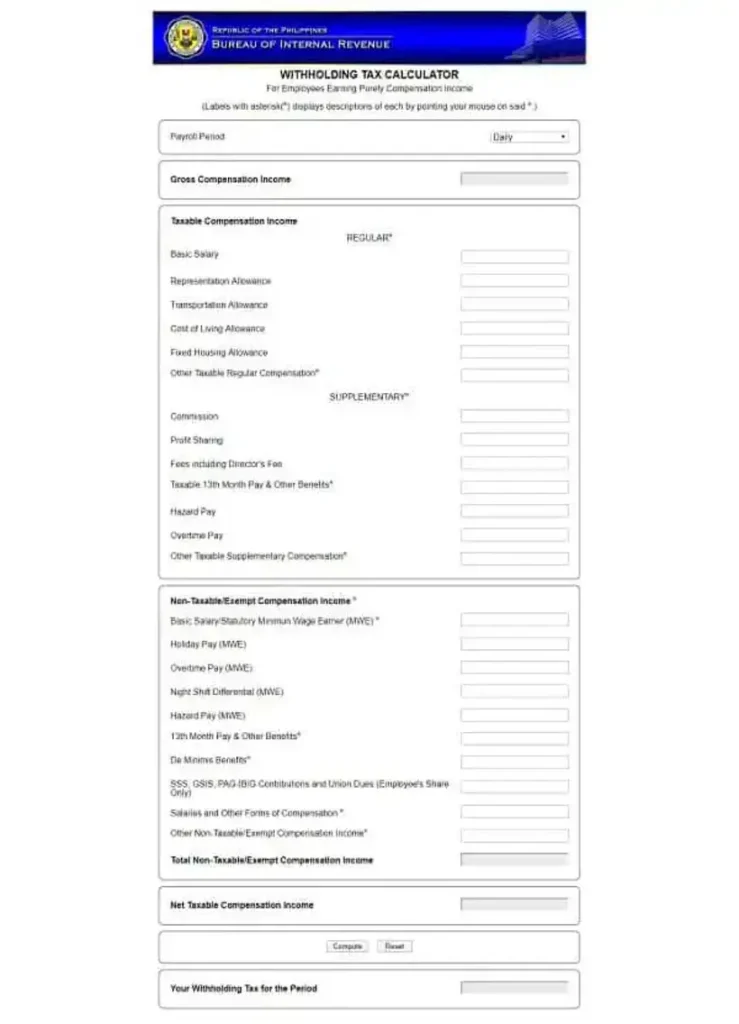
The official BIR tax calculator, conveniently accessible through the government agency’s website, stands as a valuable resource for individuals in the Philippines. Specifically designed to streamline the tax computation process for employees with compensation income, it offers a user-friendly interface that makes assessing your tax obligations quick and efficient.
One of the key advantages of the BIR Withholding Tax Calculator is its ability to serve as a tool for employees to independently verify if their employer is correctly deducting the required withholding tax from their salary. This added layer of transparency and control empowers employees to ensure their tax contributions align with the prevailing tax laws and their actual income.
However, it’s important to note that the results obtained from this calculator cannot be used as grounds for filing complaints against employers in cases of incorrect tax withholding. The calculator solely focuses on computing withholding tax, which represents the amount of tax deducted from an employee’s salary at the source.
Annual income tax, on the other hand, is a comprehensive assessment that can differ from the tax withheld. This discrepancy may occur due to various factors, such as changes in income throughout the year, such as year-end bonuses, or other taxable events.
Therefore, it’s essential for individuals to maintain a clear understanding of both withholding tax and annual income tax to ensure they meet their financial obligations effectively.
Utilizing the BIR Withholding Tax Calculator: A Step-by-Step Guide
Using the BIR Withholding Tax Calculator is a straightforward process that enables employees to estimate the withholding tax from their salary. Here are the step-by-step instructions to make effective use of this tool:
- Select Payroll Period: Begin by choosing the appropriate payroll period that aligns with your income schedule (e.g., Semi-Monthly for twice per month).
- Taxable Compensation Income Section:
- Skip the “Gross Compensation Income” field.
- Under “Regular Compensation,” input your basic salary and allowances as indicated on your payslip.
- Under “Supplementary Compensation,” enter details such as commissions, overtime pay, and other benefits received for the entire year, regardless of the payroll period.
- Non-Taxable/Exempt Compensation Income Section: If you are a minimum wage earner (MWE), you can skip fields marked with “MWE.”
- 13th Month Pay & Other Benefits: In this section, include the total benefits you received during the year, encompassing 13th-month pay, bonuses, incentives, and any other applicable income sources.
- Taxable 13th Month Pay & Other Benefits: This field will auto-fill with the amount exceeding the Php 90,000 tax exemption for this category.
- Complete Other Relevant Fields: Fill in any other relevant details, such as deductions or exemptions that apply to your specific situation.
- Compute Your Withholding Tax: Finally, click the “Compute” button to obtain an estimate of your withholding tax. The calculator will provide you with the calculated amount.
By following these simple steps, employees can quickly assess the expected withholding tax based on their income and tax profile. It’s important to remember that this tool is designed for estimating withholding tax and does not provide an accurate assessment of your annual income tax, which may vary due to changes in income and other factors throughout the year.
Department of Finance (DOF) Tax Calculator
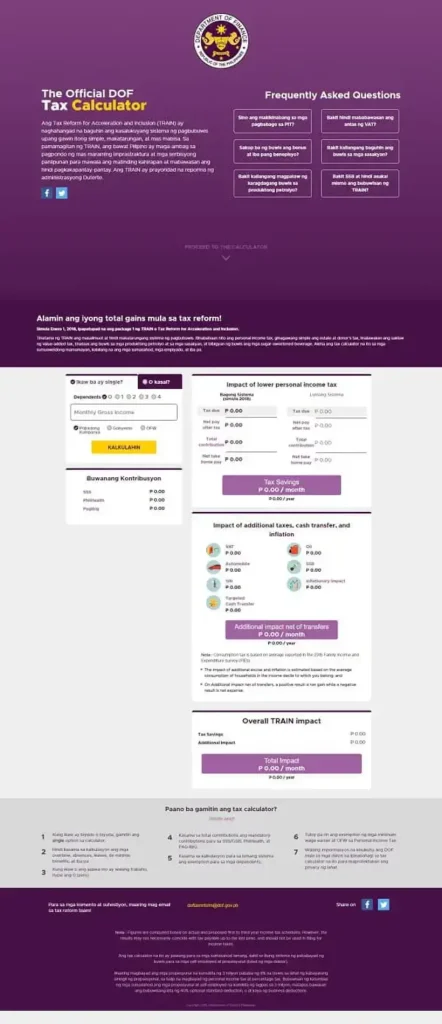
The DOF Tax Calculator made its debut alongside the implementation of the Tax Reform for Acceleration and Inclusion (TRAIN) Act in 2018, with a primary objective of educating taxpayers on how the new law would affect their personal income tax obligations. Much like the BIR’s calculator, this tool caters to both private and government sector employees, making it a widely accessible resource for a diverse range of taxpayers.
The DOF Tax Calculator offers a user-friendly interface that allows users to calculate their monthly income tax obligations under the TRAIN law, comparing it to the old tax system based on their monthly gross income.
Additionally, it provides insights into the monthly and annual tax savings one can expect under the new system. These features help taxpayers better understand the financial impact of the tax reform and make informed decisions about their finances.
While the DOF Tax Calculator is a valuable tool for estimating withholding tax, it’s essential to note that it may not provide 100% accurate results for more comprehensive financial planning. This limitation arises from its reliance on outdated SSS (Social Security System), PhilHealth (Philippine Health Insurance Corporation), and Pag-IBIG (Home Development Mutual Fund) contribution rates that were current as of 2018.
Since then, these contributions have undergone updates and hikes in 2019, 2020, and 2021. Nonetheless, for a quick estimate of withholding tax and an overview of how the TRAIN law affects personal income, the DOF Tax Calculator remains a useful resource for many Filipino taxpayers.
Using the DOF Tax Calculator: A Step-by-Step Guide
Utilizing the DOF Tax Calculator is a simple and effective process to estimate your monthly tax obligations and savings under the TRAIN law. Here are the step-by-step instructions to guide you through using this valuable tool:
- Select Civil Status: Begin by choosing your civil status, which can be either “single” or “married.” If you’re married, it’s important to note that your spouse’s income will be considered in the tax calculation, as the calculator factors in the combined income of the household.
- Input Monthly Gross Income: In the provided field, enter your monthly gross income. This should reflect your total earnings before any deductions or contributions.
- Choose Employment Sector: Select your employment sector, which can be either “private” or “government.” It’s important to choose the relevant sector, as the tax calculation can vary based on your employment type. The “OFW” option is not applicable, as foreign income is typically not subject to Philippine taxation.
- Calculate Your Taxes: Once you’ve input all the necessary details, click the “Kalkulahin” (Calculate) button. The system will then generate essential information, including your monthly contributions, the tax due, your net take-home pay, and the tax savings you can expect under the TRAIN law.
By following these straightforward steps, individuals can quickly gain insight into their monthly tax obligations and better understand the potential savings resulting from the tax reform. However, as mentioned previously, it’s essential to remember that this calculator uses older contribution rates, and for precise financial planning, consulting with current tax tables and rates is advisable.