
The UMID ID stands as one of the most accessible and essential identification documents in the Philippines. Despite its straightforward application process, there might be instances of waiting periods involved. Knowing the precise procedure is pivotal for obtaining the UMID ID seamlessly.
With an updated and comprehensive guide, individuals can navigate through the process efficiently, minimizing potential delays, and ensuring a swift acquisition of this valuable identification card. This guide serves as a fundamental resource, outlining the necessary steps to streamline the application process and acquire the UMID ID promptly and hassle-free.
What is Unified Multi-Purpose ID or UMID?
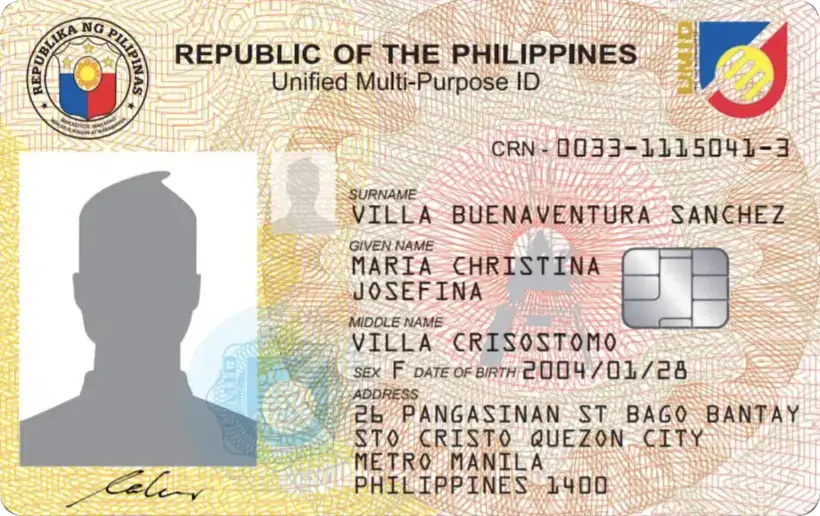
The Unified Multi-Purpose ID (UMID) functions as a singular identification card catering to members of various Philippine government agencies, namely the SSS, GSIS, HDMF (Pag-IBIG Fund), and PhilHealth. This multi-functional ID signifies a lifetime membership and serves as an instrumental tool for simplifying transactions across these governmental bodies.
Through its use of contactless smart chip technology, the UMID card securely stores crucial biometric data, including a person’s facial image, signature, and fingerprints. The incorporation of advanced security features within the card is aimed at preventing unauthorized replication or fraudulent utilization, ensuring the integrity and reliability of the identification process.
What Purposes Does the UMID Card Serve?
The UMID card holds significance as a recognized valid identification document accepted by various government institutions, financial entities, and banks throughout the Philippines. Its primary goal is to streamline and simplify identification processes by consolidating the SSS, GSIS, PhilHealth, and HDMF (Pag-IBIG) into a singular, comprehensive 4-in-1 valid ID, eliminating the necessity for multiple ID applications.
Beyond serving as a means of identity verification, the card enables convenient withdrawal of GSIS or SSS benefits and loans from ATMs. Notably, since 2015, the SSS has facilitated direct release of loan proceeds and benefit payments to bank accounts linked with the UMID card, effectively functioning as an ATM card.
Furthermore, SSS members can access specific details regarding their contributions, loan status, balance, and other SSS-related information at any SSS kiosk using their UMID card, enhancing accessibility and convenience for members.
What is the Appearance of the New UMID Card?
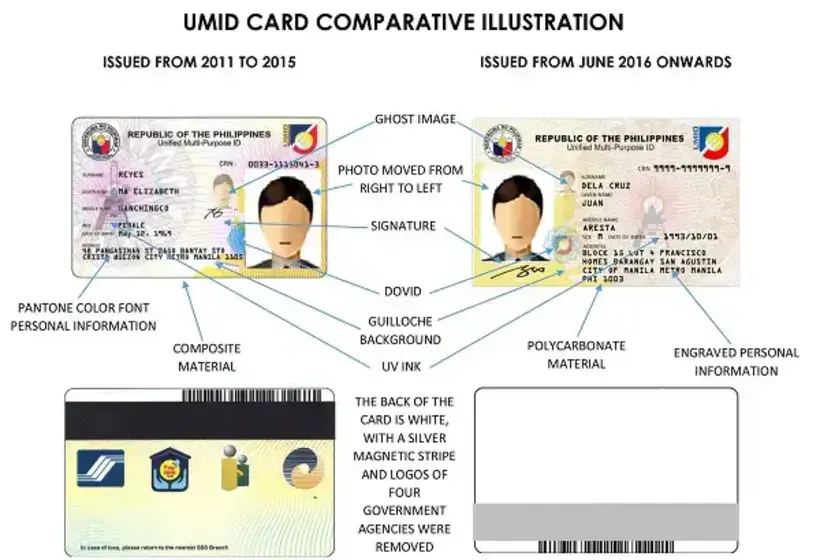
The new version of the UMID card, launched from November 9, 2015, introduces several significant upgrades aimed at improving its overall functionality and security. The enhanced features provide a more durable and secure identification experience for users. Here’s a breakdown of the key updates:
- Polycarbonate Material Upgrade: The card material has been upgraded to polycarbonate, enhancing its durability and longevity, ensuring it can withstand wear and tear for an extended period.
- Engraved Personal Information: Critical personal information such as the cardholder’s name, birth date, sex, address, and Common Reference Number (CRN) are now engraved on the card surface. This engraving helps prevent unauthorized replication of the card and enhances its security features.
- Improved Security Elements: The new version incorporates enhanced color patterns and international security features in the background, adding an additional layer of security to prevent counterfeiting.
- Adjusted Photo Placement: To comply with international travel document standards, the placement of the cardholder’s photo has been adjusted, aligning with global specifications.
- Simplified Back Design: The back of the card has undergone a design simplification, creating white space and a silver magnetic stripe. The removal of agency logos accommodates space for bank information, specifically for the efficient transfer of benefit proceeds.
It’s important to note that while the new UMID card version presents these significant upgrades, older versions of the card remain valid. There is no immediate requirement to replace older cards with the updated version. Cards issued before the November 9, 2015 upgrades are still accepted at SSS branches and self-service terminals, ensuring continued usability for existing cardholders.
The introduction of the new version aims to enhance security and functionality while providing a seamless identification experience for cardholders without invalidating the existing cards.
Who is Eligible to Apply for a UMID Card?
SSS Members

As of October 2021, eligibility for applying for a UMID card includes various criteria:
- SSS Membership and Contribution: SSS members with at least one posted contribution are eligible to apply. Those who applied for an SS number after December 10, 2020, are exempt from the UMID application form and can schedule an appointment via My.SSS for biometric data capture.
- Replacement or Update: SSS members requiring a replacement or update of their UMID cards due to reasons such as lost cards or changes in their personal information are eligible. A replacement fee of PHP 200 is applicable, and appointments must be secured at the nearest SSS branch.
For application methods, two options are available:
- Recommended Online Method: Utilize the My.SSS Appointment System for convenient online scheduling.
- Manual Application: This method is still accepted for individuals without computer access or a My.SSS account. Applicants can follow the branch number coding system for walk-in applications.
It’s important to note that further details about the My.SSS Appointment System and the branch number coding system are available for those interested in either of the application methods. These guidelines aim to provide applicants with options that suit their convenience and access to the necessary facilities for applying for a UMID card.
GSIS Members
For GSIS members and old-age/survivorship pensioners, obtaining a UMID-compliant eCard from any GSIS office is a crucial requirement to access their entitled benefits. This enhanced GSIS UMID card, tailored specifically for pensioners, offers a multitude of functionalities and benefits, providing a comprehensive set of services akin to a savings account.
Here’s a detailed breakdown of the functions and advantages associated with the GSIS UMID card for pensioners:
- Official Identification: The UMID card serves as the official GSIS identification card for pensioners, ensuring a standardized and recognized identification process.
- Transaction Enablement: It enables seamless and convenient transactions with GSIS, offering the benefits of a savings account while maintaining a pensioner’s financial operations.
- Specific Abilities for Pensioners:
- Withdrawal of Pension and Loan Proceeds: Pensioners can effortlessly withdraw their pension or pension loan proceeds using the UMID card, streamlining the access to their funds.
- Savings Account Functionality: The card facilitates the saving of money in a personal ATM savings account without the imposition of a maintaining balance requirement, providing flexibility for financial management.
- Over-the-Counter Withdrawals: Pensioners can withdraw money over the counter at Union Bank or Land Bank branches nationwide, ensuring access to funds in various locations.
- Debit Card Usage: The UMID card functions as a debit card for purchases, provided there are sufficient funds in the eCard/UMID card, allowing pensioners the ease of electronic transactions.
These functionalities not only simplify the process of accessing benefits but also provide pensioners with a wide array of financial services, ensuring ease, convenience, and greater control over their funds. The GSIS UMID card stands as an integral tool in enhancing the overall experience and management of financial benefits for GSIS members and old-age/survivorship pensioners.
What Requirements Are Needed for UMID Card Application?
Consult the list below for the most recent UMID ID requirements.
SSS Members
1. Completed UMID Card Application Form

In adherence to health protocols and to streamline the process at SSS branches, members are encouraged to minimize their time spent on-site by downloading and completing the UMID Application Form in advance.
Here’s a guide on obtaining, preparing, and filling out the UMID Application Form to facilitate a smoother application process:
Steps to Obtain the Application Form:
- Visit the Official SSS Website: Navigate to the Forms section located at the bottom of the page.
- Download the UMID Application Form: Select the Unified Multi-Purpose ID (UMID) Card Application Form for downloading.
Guidelines for Filling Out the UMID Application Form:
- Use Clear and Legible Writing: Ensure all entries are in CAPITAL LETTERS using black or blue ink to maintain readability.
- Avoid Corrections or Erasures: To prevent confusion, refrain from making any corrections on the form.
- Use Checkmarks for Selections: Mark appropriate boxes with a check, clearly indicating your choices.
- Use “N/A” if Applicable: If certain sections do not apply, use “N/A” or “Not Applicable” to denote their irrelevance.
- Match Information with SSS Database: Verify that the provided SSS number, name, date of birth, and sex align with the details in the SSS database for accuracy.
- Common Reference Number (CRN): For first-time UMID applicants, leave the CRN field blank.
- Provide Contact Details: Ensure at least one valid contact detail (email, landline, or mobile number) is provided for SSS notifications regarding the status of the UMID card application.
Adhering to these guidelines will not only expedite the application process but also ensure that the information provided is accurate and aligned with the SSS database, reducing the chances of delays or errors in the UMID card application.
2. Valid ID’s
When conducting transactions or applying for various services with the Social Security System (SSS), individuals are required to provide specific identification documents. Here is a comprehensive list of primary and secondary IDs accepted by the SSS:
Primary IDs Accepted:
- Passport
- Professional Regulation Commission ID (PRC ID)
- Seaman’s Book (Seafarer’s Identification & Record Book)
Secondary IDs Accepted by SSS (In Case of Lack of Primary ID):
- Alien Certificate of Registration
- ATM card (with cardholder’s name)
- Bank Account Passbook
- Company ID card
- Certificate of Confirmation issued by the National Commission on Indigenous People
- Certificate of Licensure/Qualification Documents from MARINA
- Certificate of Naturalization
- Credit Card
- Court Order granting petition for change of name or date of birth
- Driver’s License
- Firearm License card issued by Philippine National Police (PNP)
- Fishworker’s License issued by BFAR
- GSIS card/Member’s Record/Certificate of Membership
- Health or Medical card
- ID card issued by LGUs (e.g., Barangay/Municipality/City)
- ID card issued by a professional association recognized by PRC
- Life Insurance Policy of member
- Marriage Contract/Marriage Certificate
- NBI Clearance
- OWWA card
- Pag-IBIG Transaction Card/Member’s Data Form
- PhilHealth ID card/Member’s Data Record
- Police Clearance
- Postal ID card
- School ID card
- Seafarer’s Registration Certificate issued by POEA
- Senior Citizen card
- Student Permit issued by LTO
- TIN card
- Transcript of Records
- Voter’s Identification Card or Voter’s Affidavit / Certificate of Registration
This extensive list provides a wide array of secondary IDs accepted by the SSS, catering to various situations or instances where a primary ID might not be available. Members and individuals dealing with the SSS can refer to this comprehensive compilation to ensure they possess the necessary and valid identification for their transactions or applications.
GSIS Members
1. Completed GSIS UMID-eCard Enrollment Form
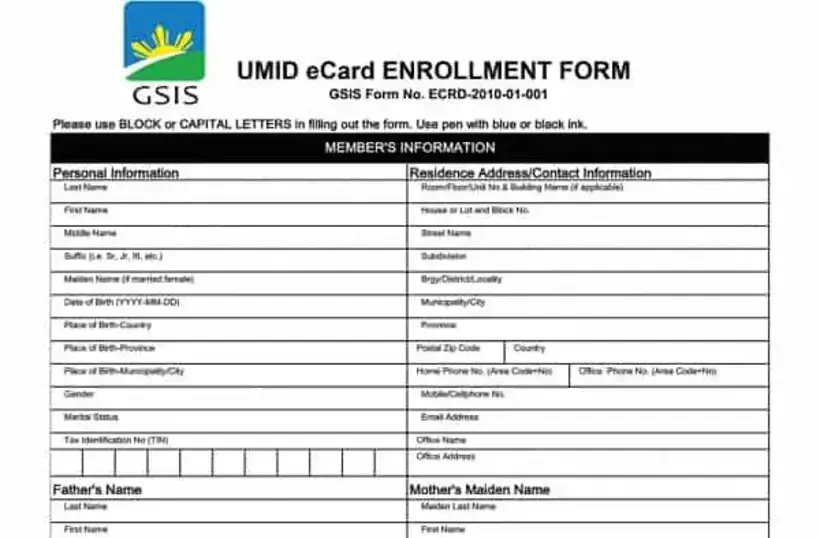
To access the eCard/UMID enrollment form, individuals can easily download it here.
- When completing the form, it is essential to follow specific instructions for accuracy and clarity. Use CAPITAL LETTERS and either black or blue ink for legibility.
- Additionally, while filling out the form, individuals need to specify their chosen bank for the withdrawal of GSIS benefits and loans, selecting between UnionBank or Land Bank as per their preference.
Following these instructions ensures the accurate and efficient processing of the eCard/UMID enrollment form, streamlining the access to GSIS benefits and loans based on the chosen banking institution.
2. Valid Government ID’s
When applying for the GSIS eCard/UMID card, presenting valid identification documents is imperative. Here’s a comprehensive list of valid IDs accepted for the GSIS eCard/UMID card application:
- Employee’s ID/Office ID
- Driver’s License
- Professional Regulation Commission (PRC) ID
- Passport
- Senior Citizens ID
- SSS ID
- COMELEC/Voters ID/COMELEC Registration Form
- NBI Clearance
- Integrated Bar of the Philippines (IBP) ID
- Firearms License
- AFPSLAI ID
- PVAO ID
- AFP Beneficiary ID
- BIR (TIN)
- Pag-IBIG ID
- Persons With Disability (PWD) ID
- Solo Parent ID
- Pantawid Pamilya Pilipino Program (4Ps) ID
- Barangay ID
- Philippine Postal ID
- PhilHealth ID
- School ID
These valid IDs serve as crucial documents in the eCard/UMID card application process, enabling individuals to authenticate their identity effectively. By presenting any of these valid IDs, applicants can expedite their application, ensuring a smooth and efficient process in obtaining the GSIS eCard/UMID card.
It’s important for applicants to have at least one of these IDs to meet the necessary requirements and ensure a successful application for the eCard/UMID card.
What Are the Steps in Applying for UMID as an SSS Member?

1. Visit an SSS Branch with UMID Enrollment Facility
The availability of UMID application processing varies across SSS branches; not all branches offer this service. It’s crucial to check the list of branches equipped for UMID enrollment. To locate the nearest branch facilitating UMID applications, users can use Ctrl+F for quick access to the branch list.
Upon arriving at the SSS office, individuals can either join the queue or obtain a queue number for their application. Subsequently, they’ll need to wait for their turn or until their number is displayed on the screen for further processing.
At SSS branches, there are two distinct methods for applying for a UMID card, offering updated application methods as of October 2021. These methods will be individually discussed, providing detailed insights into the process for a comprehensive understanding of the application procedures at SSS branches.
a. Utilize the Online Appointment System for Application
My.SSS account holders have the advantage of scheduling their UMID ID appointment at their preferred or nearest SSS branch. This method facilitates the process by allowing individuals to secure a queue number for a selected date and time, ensuring convenience and efficiency.
The steps for scheduling a UMID ID appointment online with the SSS involve a user-friendly process tailored for My.SSS account holders, offering ease and flexibility in setting up their appointments.
First Step: Visit the official SSS website and choose the Member portal.
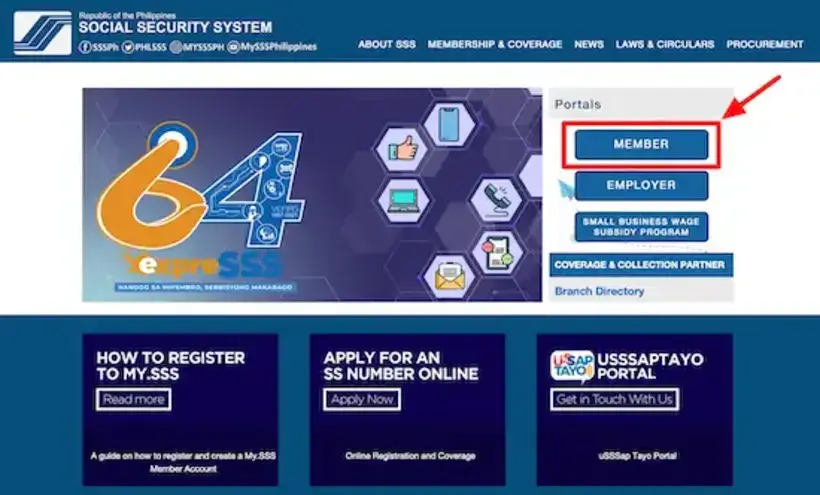
Second Step: Sign in using your User ID and password.

Third Step: Navigate to Member Info on the main menu and select Appointment System.

Fourth Step: Choose the purpose of your appointment, such as UMID Card Application.

Fifth Step: Pick your region, preferred SSS servicing branch, and appointment date (Note: Unavailable dates are marked in red, while green indicates available slots).

Sixth Step: Choose your preferred schedule and available counter number for application processing. Additionally, input your specific concern/s in the provided box (e.g., New UMID application, Lost UMID card replacement, etc.)

Seventh Step: Save a printout or take a screenshot of the transaction details displayed on the screen. An email notification will also be sent to you with the exact transaction details.

b. Walk-in Application at the Branch (Manual Process)
For individuals without My.SSS accounts, applying for a UMID card is feasible by visiting the nearest SSS branch without the need for an online appointment.
Here’s an overview of the process and the implementation of the Branch Number Coding System for efficient transactions:
1. Branch Number Coding System Implementation:
SSS branches adopt a coding system utilizing the 10th digit of SS or Employer (ER) ID numbers to assign specific transaction days.
The prescribed transaction days are as follows:
- 1 and 2: Monday
- 3 and 4: Tuesday
- 5 and 6: Wednesday
- 7 and 8: Thursday
- 9 and 0: Friday
2. Example and Scope of the Branch Number Coding System:
For example, if the last digit of an SS number is 2, the prescribed transaction day would be Monday. This system is implemented in NCR branches and specific branches across Luzon, Visayas, and Mindanao.
3. Verification Prior to Visiting an SSS Branch:
Before heading to the nearest SSS branch, it’s crucial to verify whether they accept and process UMID card applications. Check the provided list to ensure that your chosen branch is designated for UMID card transactions.
This offline method provides a systematic approach for non-online users to apply for the UMID card, ensuring a streamlined process for application and processing without the necessity of an online appointment. Individuals can rely on the Branch Number Coding System to plan their visit, facilitating an efficient application procedure at their preferred SSS branch.
2. Submit the Requirements for UMID Application
When submitting UMID requirements at the SSS branch, individuals are required to attend their scheduled appointment date or visit on the designated transaction day. It’s essential to comply with the health and safety protocols set by the SSS during the branch visit.
The process at the SSS branch involves acquiring a queue number upon arrival and waiting for their turn in accordance with the number displayed. Once called, applicants must submit the completed UMID card application form along with copies of valid identification to the SSS staff.
Staff members will then verify the provided documents and information against the SSS database to ensure accuracy and completeness in the application process. This systematic approach facilitates a smooth and organized submission process at the SSS branch for UMID card applications.
3. Undergo Biometric Data Capture
During the biometric process at the SSS branch, individuals are required to visit the designated ID and Biometric capture booth, where SSS personnel will take their photo, fingerprints, and digital signature. Upon completion, a crucial step involves the verification of biometric data.
Staff will display the UMID image on a computer screen for applicants to review, prompting individuals to double-check the accuracy of their name, birth date, and address. If any errors are spotted, applicants should promptly notify the staff to initiate corrections.
Once the details are verified, applicants will receive an acknowledgment stub, signifying the successful application process.
Furthermore, SSS staff will provide information about the estimated delivery time for the UMID card, ensuring applicants are informed about the card’s expected arrival. This meticulous process ensures the accurate capture of biometric data and details, ultimately leading to the successful application and subsequent delivery of the UMID card.
4. Await Notification from SSS Regarding UMID Card Pickup Availability
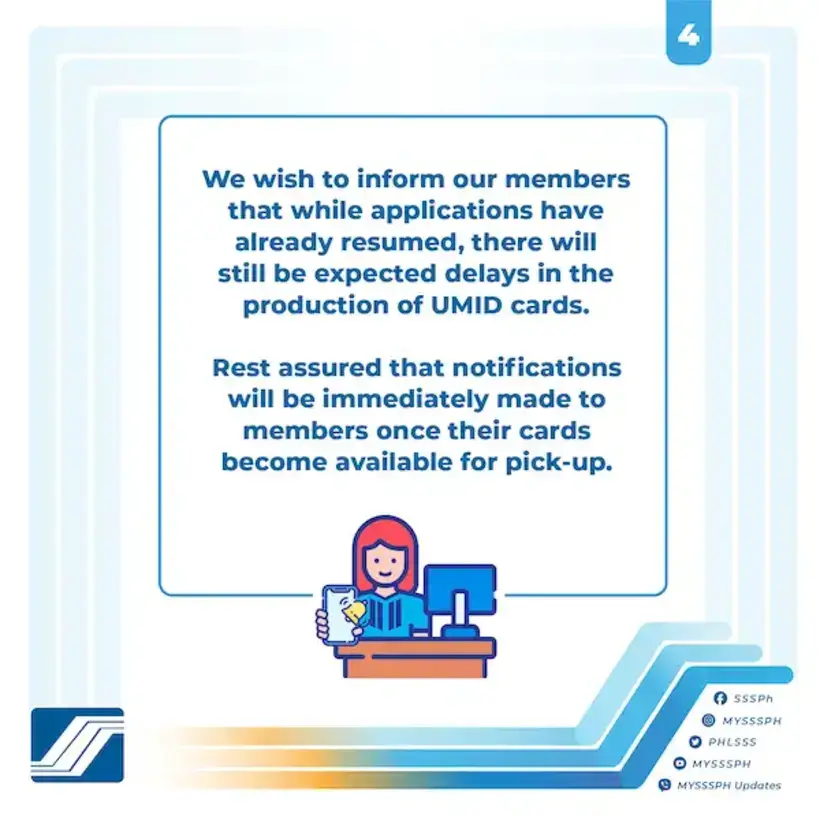
UMID card applications resumed on October 15, 2021, following a temporary suspension prompted by the pandemic. However, the resumption may lead to anticipated delays in UMID card production due to existing backlogs caused by the pandemic’s impact on operations. SSS is prioritizing UMID card applications filed in 2020 or earlier, addressing those from before the temporary suspension.
Members will receive notifications once their UMID cards are ready for pick-up. SSS ensures that the notifications will be distributed promptly and in accordance with the card production and distribution timeline.
5. Get Your UMID Card Activated
To activate your UMID card, individuals can visit the nearest SSS branch and utilize the SSS kiosk, following the activation process outlined within the provided guide. Upon activation, the UMID card opens a gateway to various benefits.
Once activated, members gain the convenience of withdrawing benefits and loan proceeds from any Bancnet ATM nationwide. Furthermore, for international transactions, the activated UMID card allows withdrawals from Visa-branded ATMs, providing an added layer of accessibility for members needing such services overseas.
What Are the Steps in Applying for UMID as a GSIS Member?
1. Visit Any GSIS Branch
GSIS branches operate on weekdays, from Monday to Friday, between 8 A.M. to 5 P.M. What sets GSIS apart is its No Noon Break policy, ensuring continuous service provision even during the lunch hour, accommodating visits throughout the day without an interruption in service.
Upon arrival at a GSIS branch, individuals should proceed to the eServices Unit or Information Center to secure a queue number, facilitating their transaction process within the branch.
2. Submit the Requirements for UMID Application
Upon your queue number being called at the GSIS branch, it’s essential to present the completed UMID form along with photocopies of your valid IDs to the enrollment officer. The officer in charge will then meticulously verify the documents submitted for the UMID card application.
This step ensures the accuracy and completeness of the provided information, paving the way for a smooth processing of the UMID card application at GSIS.
3. Complete ID Photo and Biometrics Capture
During the application process, the enrollment officer at GSIS will facilitate the capture of your photo, fingerprints, and digital signature required for the UMID card. Once the data is encoded into the UMID enrollment system, individuals are prompted to review the information for accuracy and completeness.
Following the verification process, upon completion, applicants will be provided with a UMID eCard Release Form necessary for the subsequent retrieval of their UMID card. This systematic process ensures that the captured biometrics and data are accurate and complete, culminating in the issuance of the UMID eCard Release Form, a crucial document for claiming the UMID card.
4. Await Text or Email Confirmation for UMID Card Release
GSIS employs a notification system to inform applicants regarding the availability of their UMID card for pickup. Once the UMID card is ready, GSIS sends out either a text message or an email, alerting individuals to proceed and claim their UMID card at the designated branch or location.
5. Get Your UMID eCard
To collect your UMID eCard at GSIS, visit the GSIS office where you initially submitted your UMID application. Upon arrival, obtain a queue number from the eServices Unit or Information Center to proceed with the card collection process.
When your number is called, provide the necessary documents to the card-releasing officer, including:
- the UMID eCard Release Form,
- the completed Bank Customer Information Record (available at the GSIS branch),
- and your original and photocopy of the GSIS eCard, passport, or two valid government-issued IDs.
Upon receiving your UMID card, it is important to verify that the information on the card is accurate. Additionally, confirm the readability of the card’s PIN mailer to ensure a successful activation and use of the UMID card.
6. Get Your New Card Activated
The activation process for your UMID card involves specific steps and variations based on your location and circumstances. Here’s a detailed breakdown of the activation procedures:
Standard Activation Steps:
- Visit Designated Locations: Head to various designated locations, including GSIS branches, provincial capitols, city halls, municipal halls, government offices, or select Robinsons Malls.
- Locate G-W@PS Kiosk: Find the GSIS Wireless Activated Processing System (G-W@PS) kiosk at the designated location.
- Card Placement: Place your UMID card on the e-card reader at the kiosk.
- Fingerprint Registration: Choose a pre-registered finger by touching the screen and gently place the selected finger on the fingerprint scanner.
- Confirmation Message: Wait for the confirmation message to ensure successful activation.
Activation for Pensioners Overseas:
- Request Activation Schedule: Pensioners residing abroad can request a schedule by emailing pensionglobal@gsis.gov.ph.
- Scheduled Skype Interview: On the scheduled day in Manila time, log on to Skype, ensuring good lighting, and have the scanned eCard Plus/UMID card and/or two valid IDs ready for identification.
- Identity Verification: Wait for the call from GSIS. A brief interview will be conducted to verify the pensioner’s identity and active status.
The UMID card activation procedures offer clear steps for both local and overseas pensioners to activate their cards, ensuring their proper use and functionality for accessing benefits and services. These comprehensive guidelines facilitate a smooth activation process, catering to various locations and circumstances for the convenience of cardholders.
Tips and Warnings for UMID Application
1. Beware of Fixers Offering Rush UMID Applications at a Cost

SSS strictly does not provide express or rush services for UMID processing. Be cautious of potential scams that claim to expedite UMID card release in exchange for money, such as promising faster processing for a fee of Php 100 or any other amount.
This deceptive scheme preys on individuals in urgent need of their ID, exploiting their need for a quicker process. It’s important to disregard such fraudulent messages and report them to prevent further exploitation of those seeking their identification promptly.
2. Dress in Suitable Attire
Attire guidelines must be adhered to when taking ID photos. Please refrain from wearing sleeveless tops like Sando or spaghetti straps, as these are not allowed at the ID photo booth. Additionally, it’s important to remove accessories such as eyeglasses, colored contact lenses, and dangling earrings before the photo session to ensure compliance with the regulations.
These guidelines aim to ensure a clear and accurate identification photo.
3. Provide Accurate and Full Address Details in Your UMID Application Form
It’s crucial to emphasize the significance of providing the correct address details on your UMID application. Inaccurate addresses pose the risk of UMID cards not reaching their intended recipients.
To ensure a successful delivery, it’s essential to meticulously input your complete and accurate address in the UMID application form. Proper formatting is key, and it’s advisable to follow the example provided.

For those seeking ZIP code information, the PHLPost website offers a Zip Code Search page where you can select your city or province for assistance.
Additionally, if you reside in the National Capital Region (NCR), it’s important to enter “METRO MANILA” under the “Province/State” field as part of the specific formatting guidelines. These measures significantly contribute to the timely and accurate delivery of your UMID card.
4. Ensure Someone Receives Your UMID
Recipient availability for UMID card delivery is essential for a successful receipt. Postmen will require the recipient’s signature as confirmation of the UMID’s delivery. If there’s no one available at the designated address, the UMID card will be returned to the local post office for collection.
To ensure a smooth delivery process, it’s crucial to make arrangements for someone to be present at home during the expected delivery time, especially if you’re unavailable. You can also prepare an authorization letter along with a photocopy of your valid ID for an authorized representative to present to the postman, allowing them to receive the UMID on your behalf in your absence.
These proactive measures help in facilitating a seamless and secure delivery process for your UMID card.
5. Validity of Your Previous SSS ID Varies Based on Its Issuance Date
Old SSS IDs issued within the period of 1998 to 2010 maintain their validity and are recognized at SSS branches and self-service terminals, as long as they are in good condition. This eliminates the necessity for acquiring a new UMID card, simplifying transactions for cardholders.
However, SSS IDs issued before 1998, notably the yellow cardboard type, lack the enhanced security features present in the newer identification cards. For individuals possessing these older SSS IDs, it’s recommended to consider obtaining a UMID card to benefit from updated security features and additional functionalities that these older versions may lack.
Obtaining a UMID card ensures a more secure and updated form of identification.
6. You Can Get Your UMID Card PIN by Activating It at an SSS Branch’s Information Terminal
You can retrieve your UMID card PIN code by activating it at designated SSS branches using the SSS Information Terminal. This PIN code serves a crucial purpose, facilitating the online registration of your SSS account.
Activating your UMID card is vital, especially for UMID-ATM cardholders, as it allows quick and direct withdrawals of SSS benefits rather than relying on receiving checks. The activation process is a significant step to unlock the full functionalities and benefits associated with your UMID card, providing easier access to your SSS account and its various services.
7. Upgrade Your UMID Card to a UMID ATM Pay Card Linked to a UnionBank Savings Account
The UMID ATM Pay Card presents numerous advantages for cardholders, transforming the conventional ID card into a multi-functional financial tool. The benefits are diverse and designed to enhance convenience and accessibility for users.
- Cashless Bill Payments: Upgrading to the UMID ATM Pay Card enables seamless cashless bill payments, simplifying financial transactions for cardholders.
- Purchase Mobile Load: With the upgraded UMID ATM Pay Card, users can conveniently purchase mobile load directly, streamlining the process through a single card.
- Direct Transfer of SSS/GSIS Proceeds: Linking the card to a UnionBank savings account allows for the direct transfer of SSS or GSIS loan proceeds and pension funds, ensuring prompt and hassle-free transactions.
- 24/7 Access to Funds via Online Banking: The upgraded UMID ATM Pay Card provides 24/7 access to funds through UnionBank’s online banking platform, offering convenience and flexibility for users.
- Deposit Local Checks via UnionBank App: Cardholders can leverage the UnionBank app to deposit local checks, further expanding the utility of the UMID ATM Pay Card.
- Set Financial Goals and Request Payments: Through the UnionBank Online app, users can set financial goals and easily request payments, enhancing financial management capabilities.
- No Minimum Initial or Maintenance Deposit: The upgraded UMID ATM Pay Card offers the convenience of no minimum initial or maintenance deposit, making it accessible to a wider range of users.
- Competitive Interest Rate: Cardholders benefit from a 0.1% interest rate, providing a modest return on savings kept in the linked UnionBank account.
Currently, the upgrade to the UMID ATM Pay Card is free and accessible to selected UMID cardholders. However, it is anticipated to become available to all cardholders, including those with pending UMID production, in the future.
Steps for Upgrading to UMID ATM Pay Card:
- Download UnionBank Online Banking App: Access the app from the Google PlayStore or App Store and open it.
- Open an Account: Select “Open an Account” and then opt for “Government ID,” followed by “SSS UMID Pay Card Account.”
- Agree to Terms and Conditions: Agree to the terms and conditions and verify your SSS information.
- Complete Online Form: Provide additional required information by completing the online form.
- Card Delivery and Activation: Once approved, the upgraded card will be delivered within 15 banking days for the National Capital Region (NCR) or 20 banking days for provinces. Activate the card and set a PIN using the UnionBank Online Banking app.
While UnionBank charges a PHP 100 card fee, the delivery of the upgraded card is free, enhancing accessibility to this advanced and versatile financial tool for UMID cardholders.
Frequently Asked Questions
1. Are UMID IDs and SSS IDs the Same?
The UMID ID and SSS ID are two distinct identification cards with their unique characteristics and purposes. The SSS ID, produced between 1998 and 2010, was a blue plastic card akin to a driver’s license. However, its production ceased in 2011 when the UMID was introduced to amalgamate SSS, GSIS, Pag-IBIG, and PhilHealth IDs for better integration.
Despite the transition, the older SSS ID remains a valid identification card accepted in government and financial transactions. On the other hand, the UMID (Unified Multi-Purpose ID) Card, initiated in 2011, is issued to members of SSS, GSIS, Pag-IBIG, and PhilHealth, incorporating enhanced security features compared to the older SSS ID.
Notably, UMID cards produced after 2016 underwent a design upgrade, focusing on improved security and functionality, marking a significant enhancement in their features.
2. What are the Steps for Replacing a Lost, Damaged, or Undelivered UMID Card?
The need for an SSS ID or UMID card replacement arises due to various circumstances, including the loss, non-receipt, or damage of the card. Additionally, corrections or changes to personal information such as name, address, sex, birthdate, or birthplace might necessitate a new card.
Individuals seeking to transition from the old SSS ID to the UMID card, as well as those requiring updates to their ID photo, signature, or fingerprint due to amputation or illness, also fall under the criteria for a card replacement.
General Replacement Process
For both the SSS ID and UMID card, the replacement procedure typically aligns with the initial ID acquisition process. However, when dealing specifically with UMID card replacements, certain additional steps must be taken based on the reason for replacement.
Additional Steps for UMID Card Replacement
- Correction/Change of Member Information: For corrections or changes in member information, it is necessary to submit two completed copies of the Member’s Data Change Request form along with the required supporting documents at any SSS branch.
- Lost/Non-Received UMID Card: In the case of a lost or non-received UMID card, individuals must obtain a notarized affidavit of loss or non-receipt before applying for a replacement.
- Miscellaneous Payment and Replacement Fee: To initiate the replacement process, individuals are required to fill out a Miscellaneous Payment form (R-6 form) and pay the PHP 200 replacement fee at an SSS teller counter, accredited bank, or collecting agent. The validated R-6 form or payment receipt should be submitted during the UMID replacement application.
- Surrendering Existing ID: During the UMID application process, individuals must surrender their existing SSS ID or UMID card, along with the necessary requirements. However, this step does not apply to cases involving lost or non-received cards.
Understanding the specific reasons for replacement and the subsequent process ensures a smoother and more accurate transition or update of the SSS ID or UMID card, meeting the varying needs of cardholders.
3. Does the UMID Card Have an Expiry or Validity Period?
The UMID card stands as a lifelong identification credential with no specified expiration date or validity limit. Unlike documents such as driver’s licenses or postal IDs, the UMID remains indefinitely valid throughout an individual’s lifetime, ensuring continued access to its associated benefits without the need for renewal or reissuance.
4. Is It Possible to Get UMID ID Online?
As of now, an online application process for the UMID is not available. The issuance of the UMID card necessitates physical presence at an SSS office for identity verification and the capture of biometric data. This in-person verification process is mandatory before the issuance of the UMID card, ensuring the accuracy and security of the identification details.
5. What is the Fee for Getting a UMID ID?
The initial application process for the UMID card is currently free for individuals. Additionally, according to the newly approved Republic Act 11261, first-time job applicants with a barangay certification can acquire the UMID card free of charge. However, in cases of UMID card replacement or replacing an old SSS ID, there is a Php 200 replacement fee applicable for the issuance of the new card.
6. How can I Verify or Check the Status of My UMID Card Application if it hasn’t arrived yet?
Waiting for your UMID card can be an anxious time, but there are various methods to check its application status, providing peace of mind or offering solutions if there are delays. Here are several ways to verify the status of your UMID card application:
- Utilize Your Online SSS Account: If you have an active online SSS account, log in to the My.SSS portal.
- Navigate to the E-Services menu and select “Inquiry.”
- From there, click on “Member Info” and proceed to “SSS ID card.”
- Here, you’ll find the “SSS ID Card Production Information” table displaying the processing status of your UMID card.
- Check Your Email for Updates: If you provided your email during the UMID application process, keep an eye on your inbox for status updates from the Social Security System (SSS). The SSS often communicates important information regarding the UMID card application via email.
- Contact the SSS ID Card Production Department (IDCPD): In case you haven’t received any updates or your UMID card, directly reach out to the SSS ID Card Production Department (IDCPD) via email at idcpd@sss.gov.ph.
- Ensure to include essential details such as your
- full name,
- 10-digit SSS number,
- UMID application date, and attach scanned images of your valid IDs for verification purposes.
- Following this, patiently await a response containing your tracking number, Common Reference Number (CRN), and details related to the post office transaction.
- Ensure to include essential details such as your
- Follow Up with SSS Hotline or Visit Nearest SSS Branch: Should you not receive a response via email, it’s recommended to contact the SSS hotline at (02) 920-6446 for further inquiries about the status of your UMID card. Alternatively, you can visit the nearest SSS branch for assistance and information regarding the progress of your UMID card application.
By utilizing these avenues to verify the status of your UMID card application, you can stay informed and potentially resolve any delays or issues in the process.
7. How can I claim an undelivered UMID if I missed the delivery day?
In the event that your UMID card was not delivered as expected, taking proactive steps to claim the undelivered card is essential. Contact your local or city post office to initiate the tracking process for the undelivered UMID.
To expedite the retrieval, ensure you have the necessary documents on hand for your visit to the post office. These should include:
- the UMID acknowledgment stub,
- a valid form of identification,
- and pertinent information such as the tracking number and CRN (Common Reference Number), which are typically provided by the Social Security System (SSS).
These documents will aid in the identification and retrieval of your undelivered UMID card.
8. What are the Steps for OFWs to Apply for UMID?
For OFWs (Overseas Filipino Workers) looking to apply for a UMID card, the application process involves personal appearance, either upon their return to the Philippines or at an SSS foreign office in their host country. It’s important to note that family members residing in the Philippines are unable to apply on behalf of the OFW.
Additionally, it’s crucial to be aware that not all overseas SSS branches offer UMID enrollment facilities. Therefore, OFWs should verify the specific list of SSS offices abroad that accommodate UMID applications, ensuring they apply at a location equipped for UMID processing.
Below is the list of SSS branches overseas that facilitate UMID applications:
Abu Dhabi
- Address: Embassy of the Philippines, W-48, Street No. 8, Sector 2-23, Plot 51, Al Qubaisat, Abu Dhabi
- Hours: Sundays to Thursdays, 8 a.m. to 5 p.m.
- Contacts: 0564614435 (mobile), 024465122 (landline), abudhabi@sss.gov.ph
- Appointment Booking: Available via Facebook or their website.
Bahrain
- Address: Embassy of the Philippines, Villa 939, Road 3220, Blk. 332, Bu Asheera, Mahooz Area, Manama
- Hours: Sundays to Thursdays, 8 a.m. to 3 p.m.
- Contacts: 3690-6218 / bahrain@sss.gov.ph
Brunei
- Address: Embassy of the Philippines, Simpang 336, Diplomatic Enclave, JinKebangsaan, Bandar Seri Begawan, BA 2312 Brunei Darussalam
- Hours: Mondays to Thursdays, 8 a.m. to 5 p.m., Fridays, 8 a.m. to 12 p.m., and 2 p.m. to 6 p.m.
- Contacts: 222-1173 / 716-6945 / brunei@sss.gov.ph / brunei.pe@dfa.gov.ph
Doha, Qatar
- Address: Philippine Overseas Labor Office, Office of the Labor Attache, Ground Floor, Bldg. No. 24, Jawaan Street 808 Region 39 Al Sadd, Doha
- Hours: Sundays to Thursdays, 8 a.m to 5 p.m.
- Contacts: (+974) 5591 5961 / doha@sss.gov.ph
Dubai, UAE
- Address: Philippine Overseas Labor Office, 851 Beirut St., Al Qusais 3, Dubai, United Arab Emirates
- Hours: Monday to Thursday, 7:30 AM to 3:30 PM; Friday, 7:30 AM to 12:00 NN
- Contacts: +971-562123426 / dubai@sss.gov.ph
Hong Kong
- Address: Philippine Consulate General, 14/F United Centre, 95 Queensway, Admiralty, Hong Kong
- Hours: Sundays to Thursdays, 9 a.m. to 4 p.m.
- Contacts: 3595 5357 / 3595 5358 / hongkong@sss.gov.ph
Jeddah, Saudi Arabia
- Address: Philippine Consulate General, 4663 Fajr St., Al Rehab District 6, Jeddah, Building 4, First Floor
- Hours: Sundays to Thursdays, 8 a.m to 5 p.m.
- Contacts: +966 53 850 1047 / jeddah@sss.gov.ph
Kuwait
- Address: Villa 35-A, Abdulrahman Al-Ghafeki Street, Block 1, Salwa Area, Kuwait
- Hours: Sundays to Thursdays, 7 a.m to 2 p.m.
- Contacts: +965 6097 1901 / kuwaitsss@yahoo.com / redullajm@sss.gov.ph
- Facebook Page: facebook.com/SSSKUWAITBRANCH
London, U.K.
- Address: Embassy of the Philippines, 6-11 Suffolk St., London SW1Y 4HG
- Hours: Mondays to Fridays, 9 a.m. to 5 p.m.
- Contacts: (44207) 451-1830 / (44208) 432-9864 / london@sss.gov.ph / philsss.uk@gmail.com
Macau
- Address: Philippine Consulate General, Unit 1404-1406,14/F AIA Tower, Avenida Comercial de Macau, Macau
- Hours: Sundays to Thursdays, 9 a.m. to 5 p.m.
- Contacts: 6641-8717 / mon_cheng03@yahoo.com
Milan, Italy
- Address: Philippine Consulate General, Viale Stelvio 71 – Via Bernina 18, Milan
- Hours: Mondays to Fridays, 8:30 a.m. to 5 p.m.
- Contacts: 4351-1953 / milan@sss.gov.ph
Riyadh, Saudi Arabia
- Address: Embassy of the Philippines, Alradaef St., Al Safarat, Riyadh
- Hours: Sundays to Thursdays, 8 a.m to 5 p.m.
- Contacts: 0554782440 / riyadh@sss.gov.ph / sss@philembassy-riyadh.org
Rome, Italy
- Address: Embassy of the Philippines, Via Aurelia 290/A 00165 Rome, Italy
- Hours: Mondays, Tuesdays, Wednesdays, and Fridays, 8:30 a.m. to 5 p.m., Thursdays, 9 a.m. to 5 p.m.
- Contacts: 06 54223720 / 0649746621 / loc. 226 / rome@sss.gov.ph
San Francisco, California
- Address: Philippine Consulate General, 447 Sutter St., San Francisco, California 94108
- Hours: Mondays to Fridays, 9 a.m. to 4:30 p.m.
- Contacts: 757-0641 / sanfo@sss.gov.ph
Singapore
- Address: Embassy of the Philippines, 20 Nassim Road, Singapore 258395
- Hours: Mondays to Fridays, 9 a.m. to 5 p.m.
- Contacts: 6596395453 / singapore@sss.gov.ph
Taipei, Taiwan
- Address: Manila Economic and Cultural Office, No. 55 & 57 Zhouzi St., Neihu District, Taipei City
- Hours: Mondays to Thursdays, 9 a.m. to 5 p.m., Fridays, 9 a.m. to 12 p.m.
- Contacts: 886 (02) 26588151 / taipei@sss.gov.ph
9. Is it possible to apply for UMID with a temporary SSS number?
Application for a UMID card is not viable for individuals with a temporary SSS number until their temporary number is converted to a permanent one.
To undergo this conversion process and become eligible for a UMID card, individuals holding temporary SSS numbers are required to submit their birth certificate or valid identification documents, accompanied by two completed copies of the Member Data Change Request form to any SSS branch.
This conversion ensures their temporary SSS number becomes a permanent one, allowing them to proceed with the UMID application process.
10. Where should SSS and GSIS members apply for UMID?
Depending on your employment status, the process for applying for the Unified Multi-Purpose ID (UMID) card varies. Government employees should proceed to the GSIS (Government Service Insurance System) to initiate their UMID application.
Conversely, individuals who are not employed by the government are required to apply for their UMID at the SSS (Social Security System) to begin the application process. This distinction ensures that members are directed to the appropriate institution based on their employment affiliation, facilitating a smooth application for the UMID card.
11. Which address should I use in my UMID application if I live in the province but work in Metro Manila on weekdays?
When completing the UMID application, it’s essential to furnish your permanent address. For individuals living in the province but commuting to work in Metro Manila during the week, it’s advised to specify your original permanent address—such as your residence in Antipolo—in the application form, even if you’re currently residing or renting in a Metro Manila area like Makati.
Using your permanent address ensures accurate documentation and alignment with your official residential details, maintaining consistency in the information provided for your UMID application.
12. Do I need to acquire a new UMID from SSS if I transition from a government employee with a GSIS-issued UMID to working in the private sector?
Concerning UMID cards for former government employees who are now employed in the private sector, the UMID card originally issued by GSIS retains its validity indefinitely. If your GSIS-issued UMID remains in good condition and functions effectively, there is no requirement to obtain a new UMID card from the SSS.
Exceptions to this guideline may arise in instances where your current card is lost or damaged, or if updates or corrections to your membership information are necessary. In these cases, considering a new UMID application from the SSS could be appropriate.
13. Is it possible for an unemployed individual to begin paying contributions as a voluntary member in order to qualify for UMID?
Eligibility for UMID or SSS benefits through voluntary SSS contributions has specific criteria.
Unemployed individuals lacking prior coverage or contribution records are unable to commence payments as voluntary members to qualify for UMID or SSS benefits.
Voluntary membership, designated for individuals who were formerly employed, self-employed, OFWs, or non-working spouses, mandates belonging to one of these membership categories before transitioning into a voluntary membership.
Contribution payments made initially by employed, self-employed, non-working spouses, or OFW members are recognized as valid by the SSS.
However, the first contribution made as a voluntary member is considered invalid and will be refunded by the SSS.
14. Is it possible to apply for a UMID ID through a walk-in application?
Walk-in application for a UMID ID offers certain conveniences for individuals who prefer traditional methods over digital processes. If you opt for this approach, consider the following steps for a smoother experience:
- Visit the Nearest SSS Branch: When pursuing a walk-in application for your UMID ID, locate the nearest SSS branch that accepts UMID ID applications and offers walk-in processes. This step ensures you’re in the right location to initiate your application.
- Adherence to Branch Number Coding System: To streamline the walk-in application process, adhere to the Branch Number Coding System’s guidelines established by the SSS. This system assists in managing the flow of applications for UMID IDs. The last digit of your Social Security or Employer ID number determines the specific days for UMID application processing, which are as follows:
- Monday: Numbers ending in 1 and 2
- Tuesday: Numbers ending in 3 and 4
- Wednesday: Numbers ending in 5 and 6
- Thursday: Numbers ending in 7 and 8
- Friday: Numbers ending in 9 and 0
By following this schedule, applicants can ensure a more organized and efficient walk-in application process for their UMID ID.
15. What is the usual processing time for obtaining a UMID ID?
The SSS has not officially provided a specific estimated timeline for the delivery of UMID IDs, leading to uncertainty regarding the standard processing duration. Users’ experiences have varied, with reported waiting periods ranging from 1 to 3 months for UMID ID receipt.
In certain instances, individuals have mentioned waiting for as long as six months to receive their identification card. Given the government’s known reputation for delays in ID deliveries, it is advisable to prepare for a potentially extended waiting period when anticipating the arrival of your UMID ID.
16. What is the duration for obtaining a UMID ID in Pag-IBIG?
UMID ID application services are not offered through Pag-IBIG; instead, individuals can apply for UMID exclusively by walking in or scheduling an appointment online at an SSS branch that caters to UMID ID applications.
The application process for a UMID ID within Pag-IBIG might take less than an hour to complete. Nevertheless, it is essential to anticipate a waiting period of several months following the application before receiving the UMID ID.